Why locations need codes
A warehouse without coded locations depends on people's memory: «the cooking oil is at the back, on the left side». The method works while the team is small and stable. With more products, more people or a second shift, goods are stored wherever there is space, and their location depends on what each person remembers.
A coded location solves three problems:
- The record states where each item is, not only how much there is.
- Each movement is validated with a scan: the picker scans the location, and the system confirms that it is the assigned one.
- Counts are performed by location, in aisle order, without searching for products throughout the warehouse.
The structure of a location code
The most widely used structure goes from general to specific:
| Part | What it identifies | Example | Recommended format |
|---|---|---|---|
| Zone | An area of the warehouse with one use: storage, picking, cold, quarantine | A | One or two letters |
| Aisle | An aisle within the zone | 05 | Two digits |
| Rack | A rack or section of the aisle (also called a bay or module) | 03 | Two digits |
| Level | The height within the rack, from the floor | 2 | One digit |
| Position | A place within the level, if a level holds several pallets | 1 | Optional |
With that structure, A-05-03-2 can be read without help: zone A, aisle 05, rack 03, level 2. A new employee can find it on the first day.
Rules for a reliable naming convention
- Fixed width with leading zeros. Write 05, not 5. With a fixed width, codes sort correctly in any list (A-05 before A-10), and all labels have the same format.
- One consistent separator. The hyphen is the most readable. Do not mix hyphens, periods and spaces.
- Letters that are not confused. Avoid O (confused with zero), I (with one) and S (with five) as zone codes.
- Levels counted from the floor. Level 1 is the lowest. As a result, level 1 can always be picked without lifting equipment.
- Numbering in the direction of travel. Racks are numbered in the order in which the aisle is walked; if an aisle has racks on both sides, a common practice is odd numbers on one side and even numbers on the other.
- Areas outside storage also have codes. Receiving, the dock, packing, returns and quarantine are locations; the goods in them must have a record.
- A code does not change its meaning. If a rack is removed, its code is not reused for a place elsewhere in the warehouse.
How to code the locations of your warehouse
- Draw the floor plan with the zones, aisles and racks, even by hand, with the direction in which each aisle is walked.
- Define the zones by use: picking, storage, reserve, cold, receiving, dock, packing, returns and quarantine.
- Choose the structure (zone, aisle, rack, level and, if needed, position) and the width of each part.
- Number in the direction of travel, and write down the numbering rule so that anyone who adds racks later follows it.
- Generate the codes in the system by range and review the list before creating them.
- Print the labels and place them on the beam of each level, at the same point for every location.
- Test scanning from the working position for each level, including the high levels, before labeling the entire warehouse.
- Put away the stock in its locations and record each put-away with a scan; from then on, every movement is recorded.
How to design the location label
The location label is the most used tool in the warehouse: it is scanned at every receipt, put-away, pick and count. It should include:
- The code in large text, readable at two or three meters, so the picker finds the location before scanning it.
- A barcode that the handheld reads at working distance. For high levels, larger labels are used, or labels placed at eye level with an indication of the level they correspond to.
- Material suited to the environment: in cold rooms and outdoors, labels and adhesives that withstand temperature and humidity.
- The same position on every rack, so the label does not have to be searched for.
A damaged location label stops scanning; labels should be checked during counts, and those that do not scan should be reprinted.
Special locations: pick faces, reserve and quarantine
Not all locations are used the same way. A pick face is the location from which a product is picked, with a minimum and a maximum; it is replenished from reserve locations, usually on high levels. Quarantine and returns locations hold goods that must not be allocated to any order until they are reviewed. The type of each zone determines how the system uses it: where to suggest put-away, where to pick from and which stock not to allocate.
Common coding errors
- Codes based on contents. A code such as «OILS-01» stops working when the oil changes location. The code describes the place, not what is in it.
- Different widths in the same warehouse. A-5-3 and A-05-03 look like different locations and sort incorrectly in any list.
- Labels in different places on each rack. The picker loses time looking for what to scan and ends up scanning the label of the wrong level.
- Transit areas without codes. Goods at receiving, the dock or packing disappear from the record even though they are inside the warehouse.
- Labeling before testing the scan. A small label on a high level may not scan from the floor; a test on one rack prevents reprinting everything.
How Chainlink WMS handles it
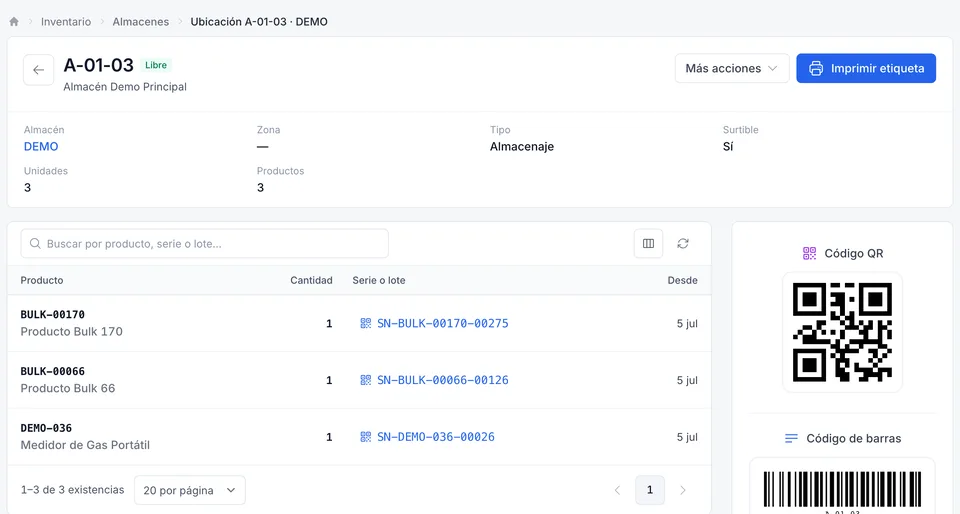
In Chainlink, locations are created by range. Select the zone (code, name and type), enter the aisles (for example, 01 to 05), the racks per aisle (01 to 04) and the levels per rack (1 to 3), then select View preview: Chainlink shows how many locations it will create, from the first to the last. The code follows zone, aisle, rack and level, for example A-01-01-1. If some locations already exist, only the new ones are created, so the same range can be generated twice without duplicates; up to 5,000 locations are created at a time.
The location label carries the code as text and as a barcode, and many labels are printed at once on a Zebra printer connected through Chainlink Wizard. Each warehouse also has four system locations (RECEPCION, SALIDA-01, DEVOLUCIONES and CUARENTENA, for receiving, outbound, returns and quarantine), and a location can be blocked with a reason, for example a damaged rack: it is no longer suggested for put-away, and its stock is not allocated to picks. See label printing and receiving.
Frequently asked questions
What does a location code include?
Usually zone, aisle, rack and level, from general to specific, and in some warehouses the position within the level. A-05-03-2 is zone A, aisle 05, rack 03, level 2.
Should codes use letters or numbers?
Letters for the zone, because there are few zones and letters are easy to remember; fixed-width numbers for aisles, racks and levels, because numbers sort correctly and are generated by range.
What happens to the codes when the warehouse is reorganized?
New racks receive new codes under the same rule. A retired code is not reused elsewhere, so that the movement history continues to show where each item was stored.