Chainlink WMS features
Chainlink covers the full warehouse cycle on the web and in the Android app. Each feature shows the plan that includes it.
Each feature in detail
How each process works on the web and on the handheld, with the actual messages and the plan that includes it.
-
Receiving
Against an inbound document or purchase order, with lot, expiration date and serial number from GS1-128, tolerance and put-away tasks on closing.
Learn more -
Picking
Location, product, lot and quantity in route order, validated by scanning, with shortages that require approval.
Learn more -
Lots and expiration dates
Lot and expiration date from GS1-128, minimum shelf life at receiving, FEFO picking, quarantine and the history of each lot.
Learn more -
Counts
By zone, aisle or list of locations, without a signal on the handheld, with separate results on closing.
Learn more -
Labels
Templates with barcodes, QR codes and variables, printed from the web or the handheld on Zebra printers.
Learn more -
Android app
The scanner of Zebra and Honeywell handhelds or the phone’s camera, a task inbox and counts without a signal.
Learn more -
Packing stations
The scale compares the weight of each box with its contents and the dimensioner records its measurements. Enterprise.
Learn more
Inbound
Goods are received against a document and put away in the suggested location.
-
All plans
Receiving
Goods are received against an inbound document or purchase order. The handheld captures lot, expiration date and serial number, including from GS1-128 labels, and accepts decimal quantities such as 12.5 kg. Receiving stops when a quantity exceeds the tolerance or a lot does not meet the product’s minimum shelf life. Several operators can receive the same document: a lead and their helpers.
See details -
All plans
Put-away
When a receipt is closed, Chainlink creates a put-away task per product, lot or pallet with a suggested location: first where the same lot already is, then the pick face, then free space in the preferred zone. If the operator changes the destination, they must record a reason.
-
All plans
Pallets (LPN)
Pallets are built at receiving, moved as a whole and picked complete when all of their contents belong to the order. Each pallet has its own code and label.
-
All plans
Bulk upload
Inbound and outbound documents in CSV or XLSX with a template and instructions. Chainlink validates each row and returns an error report by row and column. Up to 2,000 rows per file in Essentials and 10,000 in Professional.
Inventory
Every item has a location, lot, serial number and status, and every movement is recorded.
-
All plans
Locations and warehouses
Zones, aisles, racks and levels with a range generator and preview. A location blocked with a reason is no longer suggested. Chainlink creates the receiving, outbound, returns and quarantine locations in each warehouse.
-
All plans
Inventory and traceability
Stock by location, lot, serial number and pallet, with a status: available, quarantine, in transit, staged for shipping, damaged or blocked. Each movement records the product, quantity, origin, destination, user, date and time.
-
All plans
Counts
Each count is created by zone, aisle, level or list of locations and assigned to a team. Counts on the handheld work without a signal. On closing, Chainlink separates matches, wrong location, overages, shortages and products not in the system. Adjustments are applied by an Administrative user.
See details -
All plans
Transfers
Movements within the warehouse from the handheld. Between warehouses, transfer orders with picking at origin, dispatch with seal and license plates, in-transit status and receipt at destination by lot and serial number.
-
All plans
Pick face replenishment
Each pick face has a minimum and a maximum. When picking leaves it below the minimum, Chainlink creates the replenishment task from reserve stock, following FEFO.
See details
Outbound
From the order to the truck, with each step confirmed by a scan.
-
All plans
Picking
FEFO or FIFO stock allocation and guided picking: location, product, lot and quantity in route order. Depending on your configuration, the app rejects a location or lot other than the one allocated; a serial number must always be in the location being picked. A shortage is reallocated to another location or held for approval. A document can be split by zone so several pickers work at the same time.
See details -
All plans
Packing
A board of packing orders by status. Packages built by scanning, with weight, dimensions and up to 8 photos. Supervisor review, a printed packing list and a time report by phase.
-
All plans
Shipments
Packages and pallets loaded by scanning, with carrier, license plates and seal. A shipment does not leave with missing packages without an approval and a reason. A printed manifest with orders, packages, weights and signature lines.
-
All plans
Returns
Customer returns created from the original outbound document, with quantities, lots and serial numbers. Goods enter quarantine and are inspected: restock, keep in quarantine, write off as shrinkage or return to the supplier. Returned goods are not allocated to an order until they are restocked.
Team and operations
Each person has assigned tasks, and supervisors track the day’s progress.
-
All plans
Work assignment
Each receipt, put-away, pick or count is assigned to a lead and their helpers, or left in the work pool for whoever is available.
-
All plans
Mobile app
An Android app that reads with the scanner of Zebra and Honeywell handhelds or with the phone’s camera. A task inbox per operator, distinct sounds and vibration for success, warning and error, and user switching for handhelds shared between shifts.
See details -
All plans
Labels and printing
Label templates with size, resolution, barcode, QR code and variables, with a preview. Labels are printed from the web or from the handheld on Zebra printers connected through Chainlink Wizard.
See details -
All plans
Dashboard
Pending receipts, units awaiting put-away, picks in progress, the day’s shortages, low stock and open counts. Each indicator opens its filtered list.
Advanced control
Rules, analytics and RFID for growing operations.
-
Professional and Enterprise
Business rules
Rules scoped by warehouse, zone, category, product, partner or document type: tolerances, minimum shelf life, no mixing of lots, strict FEFO, location confirmation and shortage approval. Each rule blocks, warns or requests a supervisor’s approval. Essentials uses fixed settings.
-
Professional and Enterprise
Advanced analytics
Units picked per hour, inventory accuracy, dock-to-stock time, productivity by operator and inventory aging, with export to XLSX.
-
Professional and Enterprise
RFID
Handheld reading, RFID inventories, portal validation and printing with encoding.
See RFID
Automated stations
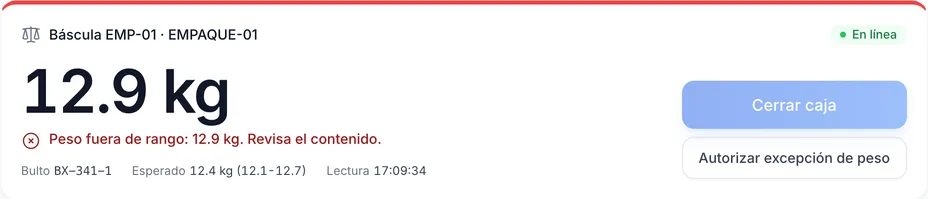
The scale verifies the weight of each box and the dimensioner records its measurements.
-
Enterprise
Packing station with scale
The packer sees the box weight on screen and the expected range, calculated from the weight of each product and the box tare. Out of range, «Close box» is blocked. If a product in the box has no registered weight, the box closes unverified with a notice.
See details -
Enterprise
Weight exception with a supervisor
Only a supervisor, with their user name and password at the station and a reason, can approve closing a box that is out of range. Each exception is recorded.
-
Enterprise
Dimensioner
Each box’s measurements carry over to the shipment. When a product is measured and its dimensions differ from the registered ones, Chainlink proposes the change and a supervisor approves it.
-
Enterprise · pilot
Put-to-light
At the put wall, the order’s slot lights up when the item is scanned and the operator confirms with the slot’s button.
-
Enterprise
Station devices that keep every reading
The Chainlink Wizard service stores every reading from the scale, the dimensioner or the fixed scanner and sends it when the connection returns, in order and without duplicates. If a device stops responding, an alert arrives within 2 minutes.
Enterprise: access, audit and residency
For operations that buy by contract and answer to audits.
-
Enterprise
Single sign-on
Your team signs in with its corporate account from Microsoft Entra ID, Okta, Google Workspace or another SAML 2.0 or OIDC provider. On first sign-in, the user is created with the role set by their group, within your licenses. You can enforce single sign-on for the whole company: two emergency administrators keep their password and each use triggers an alert.
-
Enterprise
Badge and PIN on shared handhelds
On the handheld, the operator signs in with their corporate account or, on devices shared between shifts, scans their badge and enters their PIN. Signing in ends the previous shift’s session. After the fifth incorrect PIN, the badge is locked.
-
Enterprise
Verifiable audit log
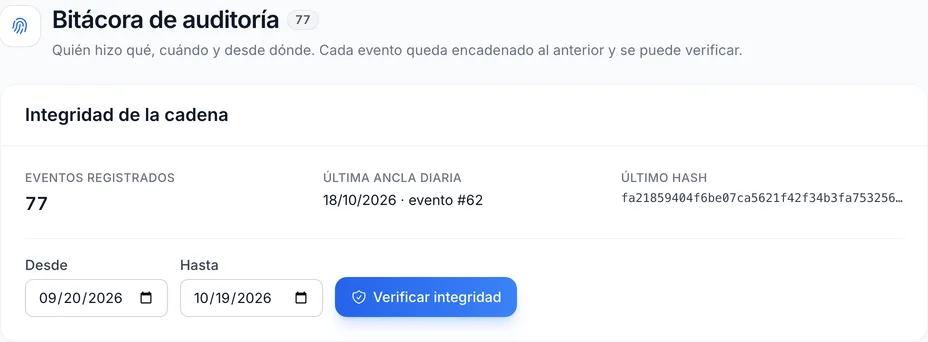
Changes to settings, users, roles and access are chained to one another with a hash. The integrity of any period can be verified, the log can be exported to a file that is checked without Chainlink, and each event can be sent to your SIEM.
-
Enterprise
Data residency
Your data is hosted where agreed: on a shared server, on a dedicated server in your contract’s region or on your own server.
-
Enterprise
Availability and dedicated support
Every month, BW measures your instance’s availability against the service level in your contract. Dedicated support with an account manager. High availability, with redundant servers and a standby database node, as an option in your proposal.
Account and security
You manage access, licenses and payments.
-
All plans
Security and access
Named user licenses and role-based permissions. Professional and Enterprise add advanced security controls.
-
All plans
Account and billing
From your account, you add licenses and devices, change plans, pay by card or SPEI, download your CFDI invoices and export your data.
Subscribe to Chainlink online
Your instance is created when sign-up is complete, ready to set up your warehouse.
Essentials and Professional are purchased online by card: the first month and the implementation are charged at subscription. 30-day trial by invitation: request it from sales.