Network, with Chainlink Wizard: discovery, setup, media calibration, test label and alerts.
Date
September 21, 2026
Firmware
Link-OS 6.6 (V80.20.24Z)
Test
Full Wizard 1.4.0 flow on real equipment
Verified
Zebra TC27 with RFD40 sled
Chainlink app on the TC27; the RFD40 sled by USB-C cable.
Date
September 16, 2026
Firmware
RFD4031-G00B700-WR, Zebra API3 SDK
Test
End-to-end RFID reading in Scan
Verified
Zebra FX9600
Network, with Chainlink Wizard: automatic configuration, reads and reader status.
Date
September 22, 2026
Firmware
3.31.22
Test
Configuration and reads with the Wizard on real equipment
Verified
STid SPECTRE
Network (Lantronix module), with Chainlink Wizard in autonomous mode.
Date
September 22, 2026
Firmware
Lantronix module V7.0.0.3
Test
Network reads with the Wizard on real equipment
More equipment
Compatible
They work with the same app and the same Chainlink Wizard.
Printers
Zebra ZT411, ZT421 and ZT231Industrial. Network or USB with Chainlink Wizard.
Zebra ZT510, ZT610 and ZT620High volume. Network or USB with Chainlink Wizard.
Zebra ZT411R, ZT421R and ZT620RPrint and encode RFID labels. Network with Chainlink Wizard.
Zebra ZD421, ZD621, ZD411 and ZD611Desktop. Network or USB with Chainlink Wizard.
Zebra ZD621R and ZD611RDesktop with RFID. Network or USB with Chainlink Wizard.
Zebra ZT200, ZT400, ZT600 and GK/GXEarlier models with ZPL. Network or USB with Chainlink Wizard.
Zebra ZQ520, ZQ521, ZQ620 and ZQ630Mobile. Wi-Fi with Chainlink Wizard.
Handhelds and phones
Zebra TC21, TC26 and TC22Chainlink app with the built-in scanner (DataWedge).
Zebra TC52, TC57, TC53 and TC58Chainlink app with the built-in scanner (DataWedge).
Zebra TC72, TC77, TC73 and TC78Rugged. Chainlink app with the built-in scanner (DataWedge).
Zebra MC2200, MC2700, MC3300 and MC3400With a physical keypad. Chainlink app with the built-in scanner.
Zebra MC3300R and MC3300xRWith a built-in RFID reader. Chainlink app with the built-in reader.
Zebra MC9300 and MC9400Long range for the warehouse. Chainlink app with the built-in scanner.
Zebra ET40 and ET45Enterprise tablets. Chainlink app with the camera or scanner.
Honeywell CT30 XP, CT45, CT47 and CT60 XPChainlink app with the barcode scanner.
Honeywell EDA51, EDA52 and EDA61KChainlink app with the barcode scanner.
Phones and tablets Android 8.0 or laterChainlink app reading with the camera.
Handheld RFID readers
Zebra RFD40 and RFD90On Zebra handhelds, with the Zebra SDK in the app.
Honeywell IH21 and IH40Supported in the app; tag reading under validation.
Fixed RFID readers
Zebra FX7500, ATR7000 and FXR90Network with Chainlink Wizard (firmware 3.10 or later).
Impinj R700, Speedway R420 and R220Network, with automatic configuration from Chainlink Wizard.
Alien and other LLRP readersGuided registration with an LLRP connector.
Station devices (Enterprise)
Mettler Toledo scales with the SICS protocolPacking station scale, by serial or USB-serial port with the Chainlink Wizard service. Not verified on physical equipment.
CAS and Torrey scales with serial outputBy serial or USB-serial port; the Wizard detects the speed and frame. Not verified on physical equipment.
Dimensioners with TCP outputBy network: length, width and height in mm, plus weight and code if sent. Not verified on physical equipment.
Light controllers put-to-light over MQTTA light and a button per put wall slot, with the Chainlink MQTT profile. Pilot. Not verified on physical equipment.
Fixed scanners by serial portBarcode reading at the station with the Chainlink Wizard service. Not verified on physical equipment.
Enterprise
Packing stations with a scale
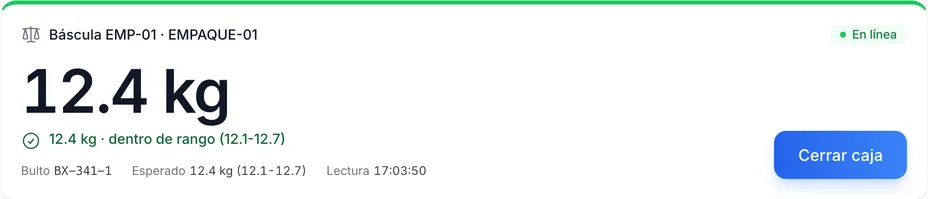
The Chainlink Wizard service reads the station’s scale, dimensioner and scanner. The weight appears on the packer’s screen with the expected range; out of range, the box does not close without a supervisor. Without internet, each reading is stored and sent when the connection returns.
App: Android 8.0 or later. On Zebra handhelds, the app creates its DataWedge profile. On phones, it reads with the camera.
RFD40: connect it to the TC27 with a USB-C cable or the TC2x adapter. A mount without a data connection does not work.
Chainlink Wizard: a computer with macOS, Windows or Linux on the same network as the printers and readers.
STid readers: the Wizard acts as a bridge between the reader and your instance; it must stay open or be installed as a system service.
Station devices (Enterprise): the Wizard installed as a system service on a computer next to the station, with the scale on a serial or USB-serial port.
Subscribe to Chainlink online
Your instance is created when sign-up is complete, ready to set up your warehouse.
Essentials and Professional are purchased online by card: the first month and the implementation are charged at subscription. 30-day trial by invitation: request it from sales.