Android app
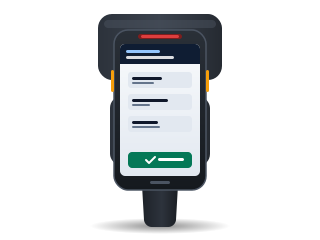
The Chainlink app for Android: Zebra and Honeywell handhelds and phones
The Chainlink WMS app runs on handhelds and phones with Android 8.0 or later. It reads with the scanner of Zebra and Honeywell handhelds or with the camera, shows each operator their tasks and counts without a signal. It is included in every plan.
- Available in
- All plans
- System
- Android 8.0 or later
- Reads with
- The built-in scanner or the camera
- Languages
- Spanish and English
Reviewed October 29, 2026 by the Business in a Wave team
Supported devices
The TC27 with the RFD40 sled is field-verified; the other models are compatible. The full list is on the hardware page.
-
TC27 with RFD40 verified
Zebra handhelds
TC21, TC22, TC26, TC52, TC53, TC57, TC58, TC72, TC73, TC77, TC78, MC2200, MC2700, MC3300, MC3400, MC9300, MC9400, ET40 and ET45.
-
Compatible
Honeywell handhelds
CT30 XP, CT45, CT47, CT60 XP, EDA51, EDA52 and EDA61K.
-
Android 8.0 or later
Phones and tablets
With Android 8.0 or later, reading with the camera.
How the app reads codes
- Zebra: the app creates its own DataWedge profile, with no manual configuration
- Honeywell: the app uses the device scanner
- Phones: the app reads with the camera
Success, warning and error each have a distinct sound and vibration.
What each operator sees
The operator sees their own tasks and those in the work pool: receipts, put-aways, pick lists and counts.
- The operator takes a task as lead or joins as a helper
- The app also supports building pallets, moving stock, looking up items by scanning and printing labels
What works without a signal
Any work the app cannot send is stored on the handheld and sent when the connection returns.
- Counts
- Work in full and are sent when the connection returns.
- Put-aways and movements
- Are stored on the handheld and sent when the connection returns.
- Receiving and picking
- Require a connection to start and to close.
Sharing a handheld between shifts
Each operator signs in with their own user through Switch user. Tasks in progress remain under the name of the person who started them.
- The first session registers the handheld in your instance
Reading RFID tags
RFID reading is available in Professional and Enterprise. With the Zebra RFD40 sled connected to a TC27 by USB-C, the app reads EPCs and links them to product, lot, serial number, pallet and location.
- This combination is field-verified; the MC3300R and MC3300xR are compatible
- In Essentials, the app reads barcodes
Operator sign-in in Enterprise
In Enterprise, the operator signs in with a corporate account from Microsoft Entra ID, Okta, Google Workspace or another SAML 2.0 or OIDC provider.
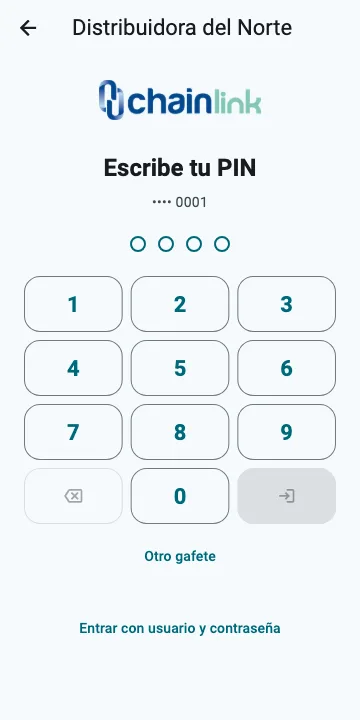
- On shared handhelds, the operator uses a badge and PIN; signing in ends the previous shift’s session
- After the fifth incorrect PIN, the badge is locked
Installation
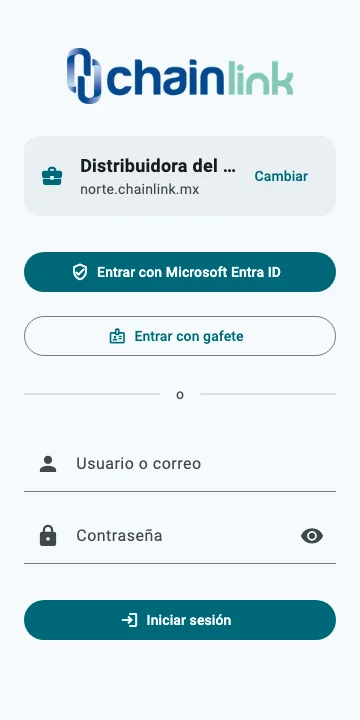
The app is installed from Google Play. On first launch, the operator enters the company address, such as yourcompany.chainlink.mx, and signs in. The app is available in Spanish and English.
| Feature | Essentials | Professional | Enterprise |
|---|---|---|---|
| Android app with scanner or camera | Yes | Yes | Yes |
| RFID reading with a handheld | No | Yes | Yes |
| Single sign-on in the app | No | No | Yes |
| Badge and PIN on shared handhelds | No | No | Yes |
How it is configured
Help center articles with the steps inside Chainlink.
Keep reading
Frequently asked questions
For any other question, contact sales.
Is the app charged separately? +
No. The app is included in every plan, and each operator signs in with their user license. A handheld does not require a device license, with or without an RFID reader.
Is there an iPhone version? +
No. The Chainlink app runs on Android 8.0 or later, on handhelds and phones.
Which languages does the app support? +
Spanish and English.
What if a handheld is not on the hardware list? +
If it runs Android 8.0 or later, the app reads with the camera. To use the built-in scanner, send the brand and model to sales before purchasing the device.
Subscribe to Chainlink online
Your instance is created when sign-up is complete, ready to set up your warehouse.
Essentials and Professional are purchased online by card: the first month and the implementation are charged at subscription. 30-day trial by invitation: request it from sales.