Enterprise
Packing stations with weight verification
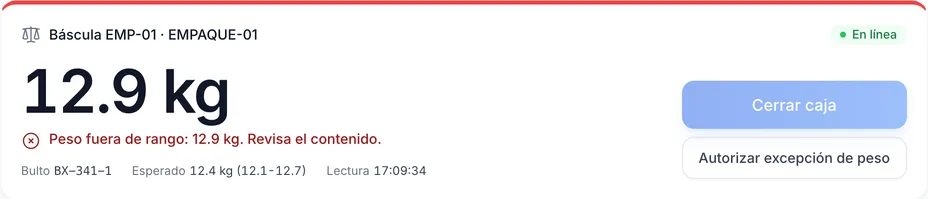
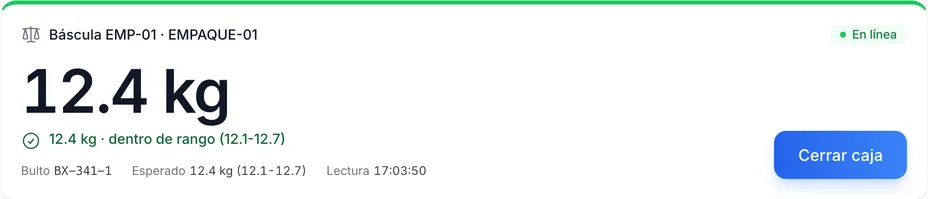
At a Chainlink WMS packing station, the scale compares the weight of each box with its contents. A box that is out of range does not close without a supervisor. The dimensioner records its measurements.
- Available in
- Enterprise
- Initial tolerance
- 5% and 50 g
- Devices
- Scale, dimensioner and fixed scanner
Reviewed October 29, 2026 by the Business in a Wave team
How the expected box weight is calculated
The expected weight is the box tare plus the weight of each item multiplied by its quantity.
- The tolerance is the greater of a percentage and a minimum in grams
- The initial values are 5% and 50 g; with a scale, 3% is recommended
A box out of range
When the scale reading is out of range, «Close box» is blocked, and the message states the weight, the expected weight and the range.
- Only a supervisor, with user name, password and a reason, can approve closing the box
Products without weight, measurements and offline devices
-
A product without a registered weight
The box closes unverified with a notice, so the catalog can be completed without stopping packing.
-
What the dimensioner records
The length, width and height of each box, for the shipment. Put-to-light is in pilot.
-
Connection loss and unresponsive devices
Chainlink Wizard stores each reading and sends it when the connection returns, in order and without duplicates. If a device stops responding, an alert is issued within 2 minutes.
Station devices
BW tested these devices with simulators. They remain listed as «Compatible» until they are verified on physical equipment.
-
Compatible
Mettler Toledo scales with the SICS protocol
Packing station scale, by serial or USB-serial port with the Chainlink Wizard service. Not verified on physical equipment.
-
Compatible
CAS and Torrey scales with serial output
By serial or USB-serial port; the Wizard detects the speed and frame. Not verified on physical equipment.
-
Compatible
Dimensioners with TCP output
By network: length, width and height in mm, plus weight and code if sent. Not verified on physical equipment.
-
Compatible
Light controllers put-to-light over MQTT
A light and a button per put wall slot, with the Chainlink MQTT profile. Pilot. Not verified on physical equipment.
-
Compatible
Fixed scanners by serial port
Barcode reading at the station with the Chainlink Wizard service. Not verified on physical equipment.
Plan comparison
| Feature | Essentials | Professional | Enterprise |
|---|---|---|---|
| Packing into packages with weight, measurements and photos | Yes | Yes | Yes |
| Comparison of the weight entered by hand | Yes | Yes | Yes |
| Packing stations with scale and dimensioner | No | No | Yes |
How it is configured
Help center articles with the steps inside Chainlink.
Keep reading
Frequently asked questions
For any other question, contact sales.
Which scales are supported? +
Mettler Toledo scales with the SICS protocol and CAS and Torrey scales with serial output, by serial or USB-serial port. They are compatible and not verified on physical equipment: BW built and tested the integration with simulators.
Does packing work without a scale? +
In every plan, packing records the weight entered by hand and, if the warehouse enables it, compares it with the expected weight. Depending on the setting, the system does not compare, warns of the difference or prevents the package from closing. Direct reading of a station scale is an Enterprise feature.
Is a reading lost if the internet connection drops? +
No. The Chainlink Wizard service stores each reading and sends it when the connection returns, in order and without duplicates.
Subscribe to Chainlink online
Your instance is created when sign-up is complete, ready to set up your warehouse.
Essentials and Professional are purchased online by card: the first month and the implementation are charged at subscription. 30-day trial by invitation: request it from sales.